Add credit and auto top-up
Add credit from $10 on the Billing page, set a monthly top-up so a busy month never stops your endpoints, and get an email before your balance runs low.
BitsRun is prepaid. You add credit, your endpoints draw from it per second while they are awake, and they stop when it reaches $0. You never get a bill you did not expect.
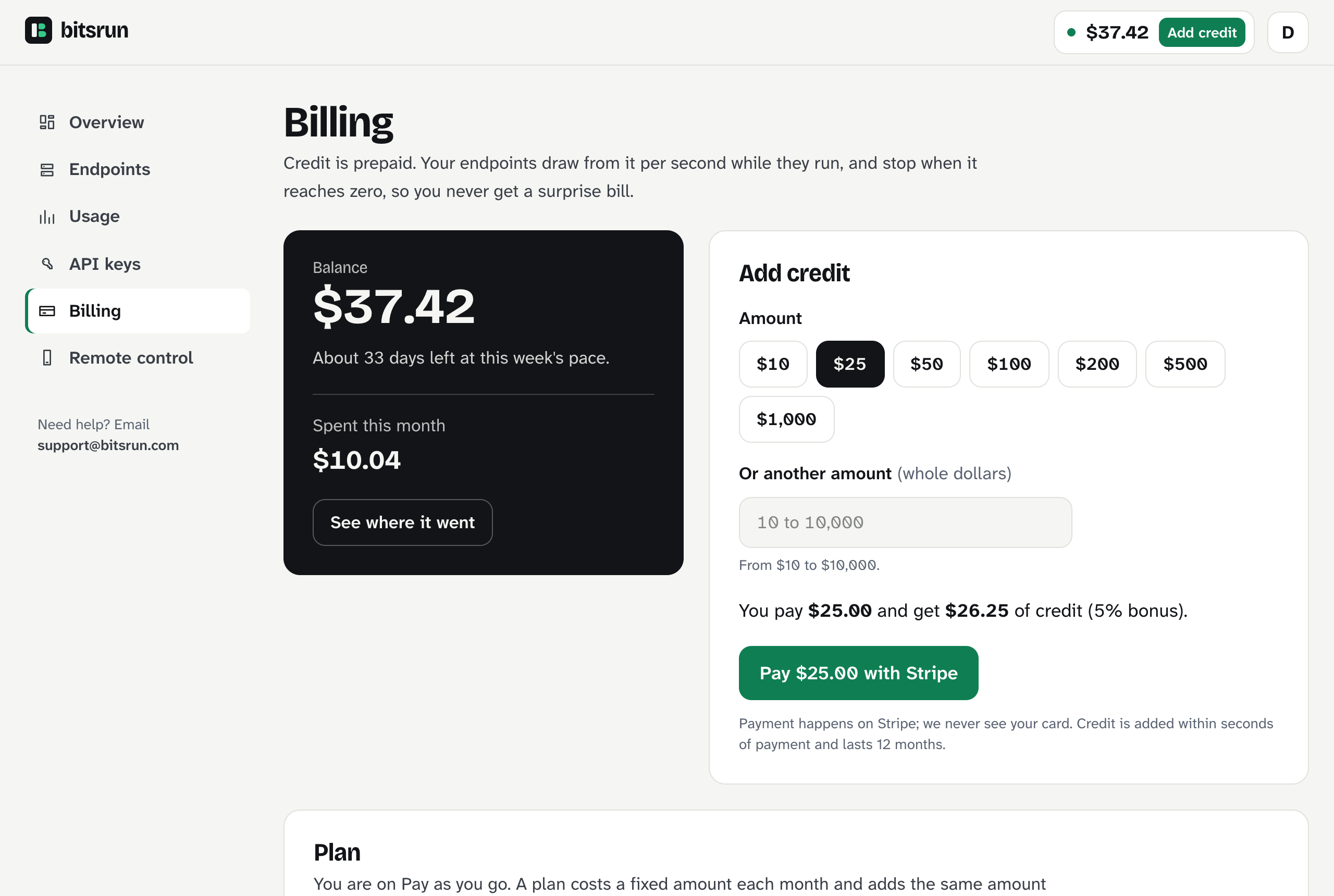
Add credit
- Open Billing in the dashboard, or select Add credit next to your balance at the top of any dashboard page.
- Pick an amount ($10, $25, $50, $100, $200, $500 or $1,000), or type any whole-dollar amount from $10 to $10,000 under Or another amount.
- Check the line that says what you pay and what you get. On Pro and Business it includes your bonus.
- Select Pay with Stripe and pay on Stripe's secure page.
- You return to Billing. The credit appears within seconds.
Stripe handles the payment; BitsRun never sees your card number. Credit you pay for does not expire.
Monthly top-up
A monthly top-up adds the same amount of credit every month, so a busy month never stops your endpoints.
- On Billing, find Monthly top-up.
- Type the amount for each month, in whole dollars.
- Select Start monthly top-up and confirm on Stripe.
Cancel any time from the same card.
Balance emails
BitsRun emails you when your balance drops below a level you choose, with a link that adds credit in one step.
- On Billing, find Balance emails.
- Keep Email me when my balance drops below checked and set the amount. The default is $5.
- Under Amount the email link fills in, set what the link should top up. The default is $25.
- Select Save balance emails.
Set the level to 0 to turn the low-balance email off. The email that tells you your endpoints stopped at $0 always goes out.
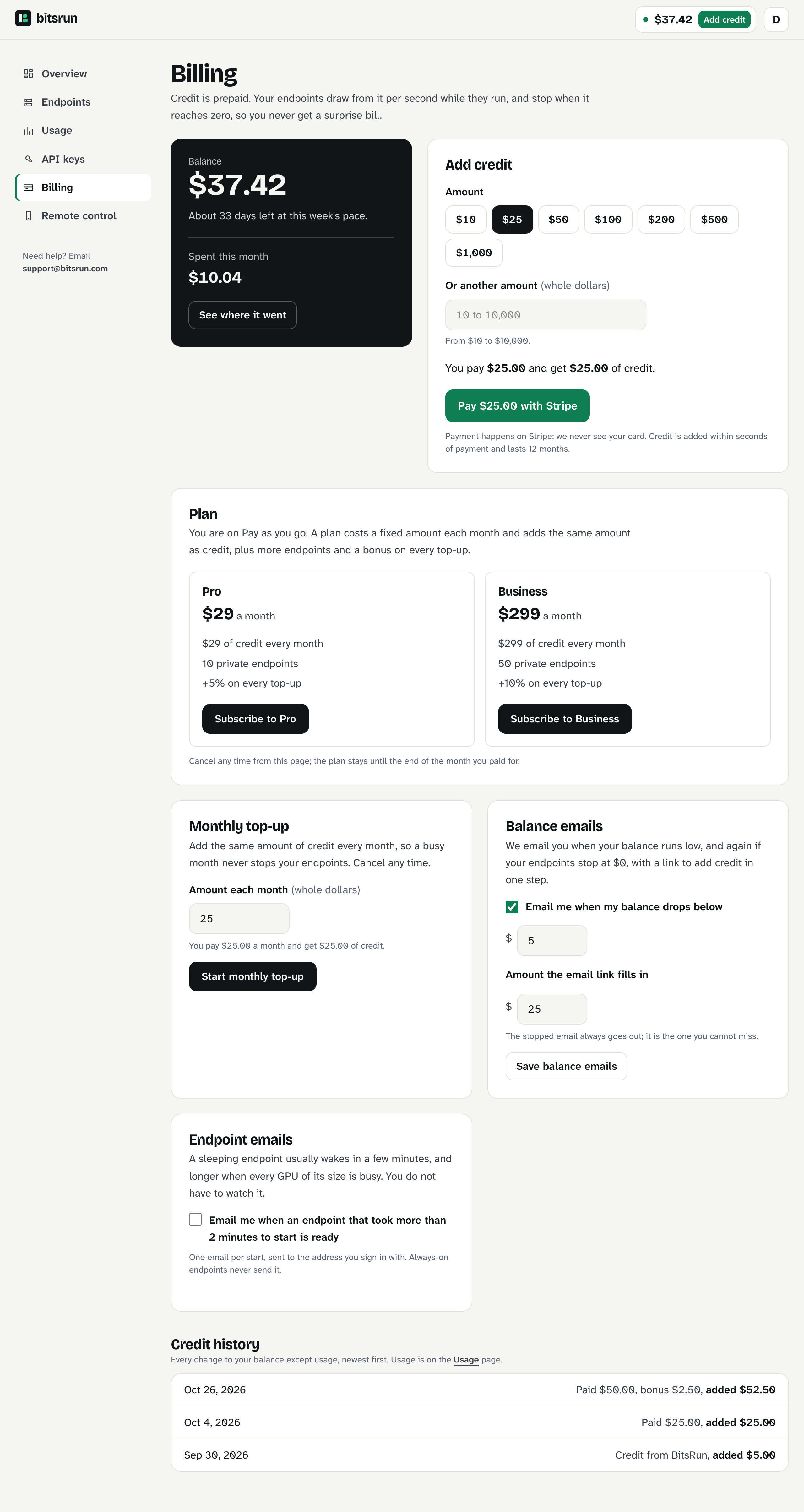
Credit history
Credit history at the bottom of Billing lists every change to your balance except usage, newest first: top-ups with their bonus, plan credit, and any credit from BitsRun. Usage is on the Usage page.
Refunds
Refunds are never automatic. To ask for one, write to support@bitsrun.com from the email you sign in with, and say which payment and why.
- What can be refunded: credit you paid for and have not used, within 60 days of the payment. When your account closes, all your unused paid credit, whatever its age.
- What cannot: credit you have used, bonus credit, and the credit that comes with a plan. Bonus and plan credit are promotional and have no cash value.
- How it is paid: the money goes back to the payment method you used. The matching credit leaves your balance, with any bonus that came with it.
- Plans and monthly top-up: cancel any time. A plan stays until the end of the month you paid for, and there is no refund for part of a month.
- If a charge looks wrong: write to support and we review it.
If you delete your account, your plan and monthly top-up are cancelled and any balance left closes with the account. The credit you paid for and did not use is still yours, whatever its age: ask support before or after you delete it and we refund it.
What can go wrong
400 invalid_amount: top-ups are whole dollars from $10 to $10,000.503 payments_unavailable: adding credit is briefly unavailable. Try again in a few minutes, or write to support.- "Payment cancelled. Nothing was charged.": you closed the Stripe page before paying. Your card was not charged.
- The credit did not appear: it usually takes a few seconds. Refresh the page. If it is still missing after a few minutes, write to support with the time of the payment.
402 credit_required: uploading or copying a model needs a positive balance, because stored models are kept for you. Add credit first.
Still stuck?
Email support@bitsrun.com with what you tried and any request id you saw. A real person answers.